

Salesforce goal pacing shows whether your organization is on track or off track against targets throughout the period.
In practice, this is delivered through a Salesforce goal pacing dashboard that leadership can rely on week to week.
It’s used by revenue leaders to manage execution across company, region, team, and rep levels — and to pace not only quota, but the leading indicators that drive it, such as pipeline, coverage, activity, and conversion.
This is not about setting goals in Salesforce.
It’s about running the business against them.
Why goal pacing matters more than goal setting
Most revenue teams don’t fail because the target was unclear.
They fail because leadership couldn’t see — early enough — whether performance was converging on the target or drifting away from it.
Traditional goal tracking answers:
What was the target?
What did we achieve?
Goal pacing answers:
Are we on track right now?
Where is performance slipping — and where?
Which levers still matter this period?
That difference is why pacing has become a leadership requirement, not a reporting nice-to-have.
Executive goal pacing in Salesforce: one revenue view leadership can run from
At the executive level, pacing needs to be unambiguous.
One view that shows:
target vs actual
clear on-track / off-track status
across the dimensions leadership manages
This mirrors how leadership already operates at the top of the funnel. CROs don’t run the business from dozens of reports — they rely on a small set of trusted views. The same pattern shows up in Salesforce dashboards sales leaders actually use to run forecast calls, reviews, and board discussions.
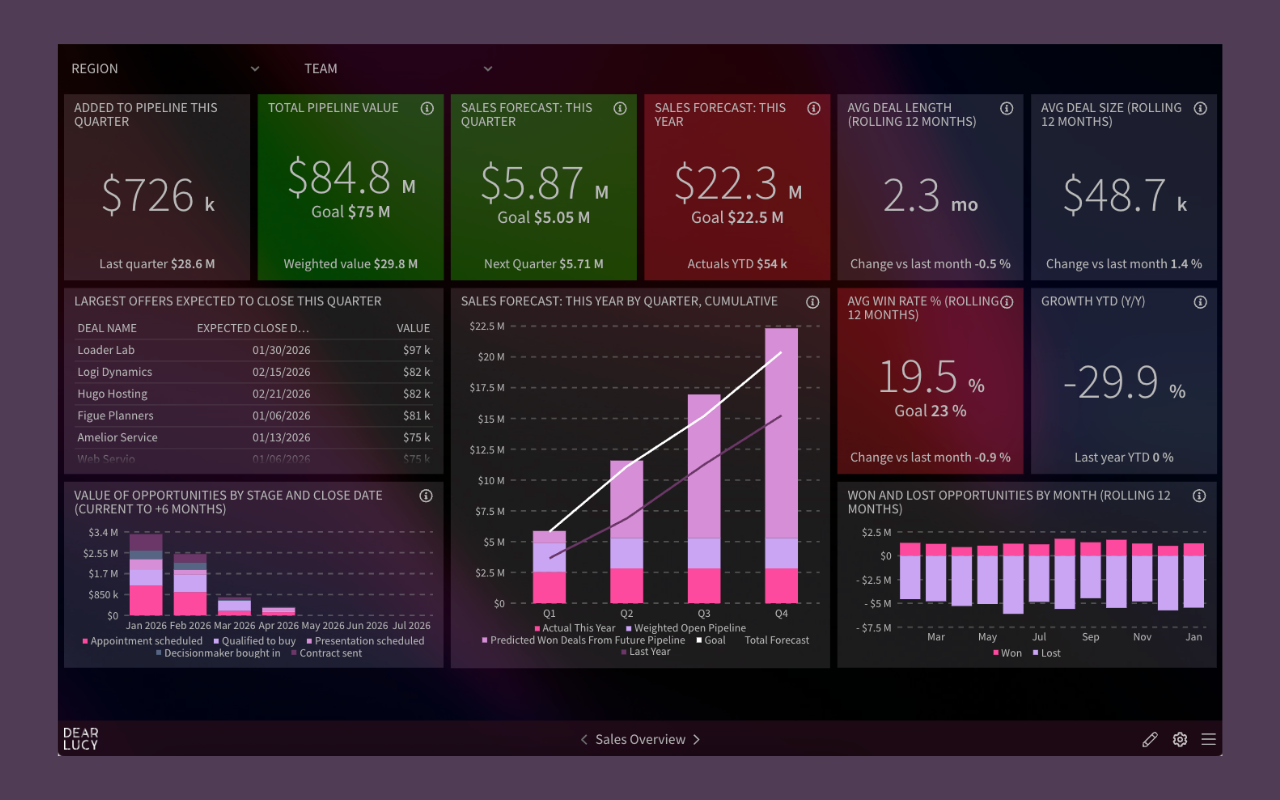
Executive goal pacing dashboard built on Salesforce data, giving leadership a single revenue view with clear on-track and off-track signals across regions and teams.
This view exists to support decisions, not explanations.
When it’s missing, leadership asks for context.
When it’s present, leadership moves faster.
This is what Salesforce goal pacing looks like when it’s built into how leadership runs the business.
Goal pacing must exist at every level of the revenue organization
Goal pacing only works when the same logic applies everywhere.
High-performing revenue teams pace goals consistently across:
Company level
Is the business on track overall?
Business unit / region
Where is risk accumulating?
Where is momentum stronger or weaker?
Team level
Which teams are off track?
Where should managers intervene?
Individual level
Are reps building enough momentum?
Who is drifting early vs temporarily behind?
Different views.
Same Salesforce data.
Same pacing logic.
This consistency is what creates alignment without constant reconciliation.
Why quota pacing alone is insufficient in Salesforce
Experienced CROs know this pattern well:
Revenue doesn’t miss because quota was unrealistic.
It misses because the inputs stopped supporting the outcome.
That’s why modern goal pacing includes leading indicators, not just revenue.
Common examples sales leaders pace alongside quota:
pipeline creation
pipeline coverage
opportunity progression
activity metrics that correlate with outcomes
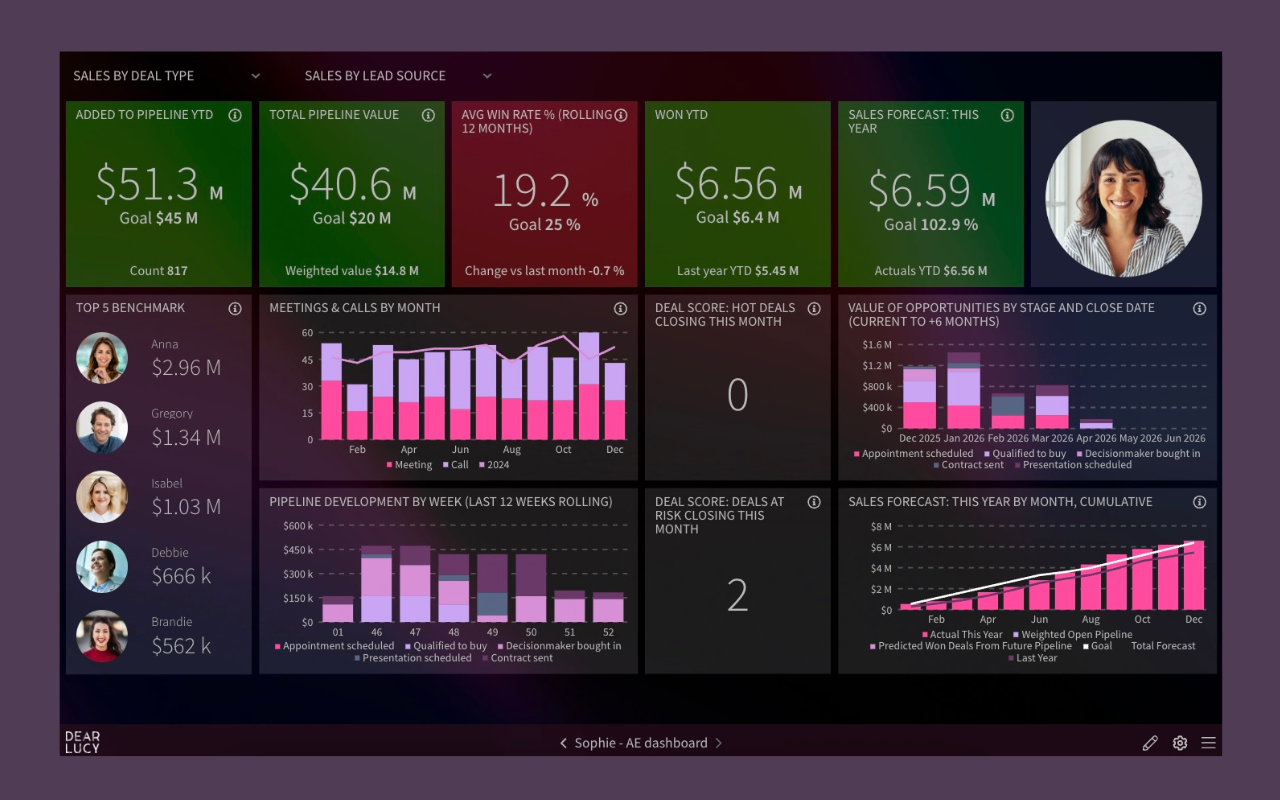
Salesforce personal goal pacing dashboard showing individual targets, leading indicators, and clear on-track or off-track pacing for sales reps.
This is where pacing becomes operational:
reps know what matters now
managers coach earlier
outcomes stop being surprises
Why Salesforce-native goal tracking often falls short
Salesforce can store targets.
It struggles to support pacing.
Common leadership pain points:
targets exist, but trajectory does not
performance is visible only after the fact
comparisons across teams or regions are cumbersome
leading indicators live in separate reports
leadership reviews rely on interpretation, not signal
The predictable result:
spreadsheets
parallel dashboards
duplicated logic
erosion of trust
Not because Salesforce is broken —
but because leadership needs continuous context, not static reports.
Goal pacing is an operating rhythm, not a report
Accurate pacing doesn’t come from better charts.
It comes from how the organization uses the information.
Strong revenue teams:
review pacing weekly
use the same pacing view in forecast calls
hold managers accountable for on-track / off-track status
look at leading indicators alongside outcomes
intervene early, not emotionally late
A quiet but important truth revenue leaders share:
Performance improves when pacing is visible and reviewed consistently.
What “good” Salesforce goal pacing looks like in practice
When goal pacing works:
leadership alignment improves
surprises decrease
coaching becomes proactive
forecast confidence increases naturally
spreadsheets disappear
Not because targets changed.
Because visibility did.
How revenue teams pace goals on Salesforce with Dear Lucy
Dear Lucy adds a goal pacing layer on top of Salesforce data — without changing how teams work in CRM.
Revenue leaders get:
continuous pacing vs targets
clear on-track / off-track signals
pacing across company, region, team, and individual levels
support for revenue goals and leading KPIs
one revenue view used in reviews, forecast calls, and board meetings
All powered by Salesforce data.
All updated automatically.
TL;DR: Salesforce goal pacing
What it is: A clear signal of whether performance is on track or off track against targets
Why it matters: Enables earlier intervention and better decisions
What it includes: Quota and the leading indicators that drive it
Who uses it: CROs, sales leaders, managers, and reps
Outcome: Fewer surprises, less manual work, more trust
FAQ: Salesforce goal pacing
What is Salesforce goal pacing?
Salesforce goal pacing shows whether performance is on track or off track relative to targets throughout the period.
How is goal pacing different from goal setting?
Goal setting defines the target. Goal pacing shows whether execution is converging on that target in time to act.
Should goal pacing include leading indicators?
Yes. High-performing teams pace both revenue goals and the KPIs that produce them, such as pipeline and activity.
Who should see goal pacing dashboards?
Executives, managers, and reps — each with role-levant views built on the same Salesforce data.
Why do teams still use spreadsheets for pacing?
Because Salesforce-native reporting doesn’t provide a clear, shared pacing signal across levels.
Connect Salesforce. Dashboards appear automatically.