

If you’re running revenue in Salesforce, the system usually isn’t the problem. Trust is.
Not trust in Salesforce as a platform — trust in the numbers that show up in forecast calls, leadership meetings, and board updates. Too often, teams spend time reconciling views, rebuilding decks, and explaining why the dashboard doesn’t quite match the board slide.
Over time, revenue leadership starts happening around Salesforce instead of with it.
This post breaks down the small set of dashboards CROs actually rely on week to week — and what “good” looks like when reporting supports decisions instead of creating more work.
This post shows how sales leaders use Salesforce dashboards in practice — to run forecast calls, leadership reviews, and board meetings.
TL;DR
CROs don’t need more Salesforce dashboards — they need trust. The most effective sales leaders rely on a small set of dashboards for forecasting, goal pacing, pipeline health, and CRM hygiene to run forecast calls, board updates, and weekly reviews with confidence.
What CROs are really trying to solve with Salesforce reporting
Most CROs aren’t looking for more analytics. They’re looking for operational clarity: a forecast they can stand behind in a board meeting, early signals when the quarter is drifting, and one revenue narrative that leadership, managers, and reps can all use.
When that clarity isn’t there, teams fill the gaps with spreadsheets, custom rollups, and side dashboards that quickly become “another system to maintain.”
That’s not a tooling problem. It’s a visibility problem.
How strong CROs actually use Salesforce dashboards
High-performing sales leaders don’t rely on dozens of dashboards. They converge on a small set of views used consistently — in forecast calls, leadership reviews, and day-to-day management.
What matters isn’t complexity. It’s whether the dashboard answers the questions that come up every week.
Pipeline & forecast: the board-ready view
This is the view CROs rely on when someone asks, “Are we on track?”
It brings together forecast vs target, pipeline coverage, commit and best case, and clear signals about deal risk. The value isn’t precision down to the last dollar — it’s credibility.
When this view works, forecast calls stop being debates about numbers and become conversations about risk and action. Leadership can see not just where revenue stands, but why.
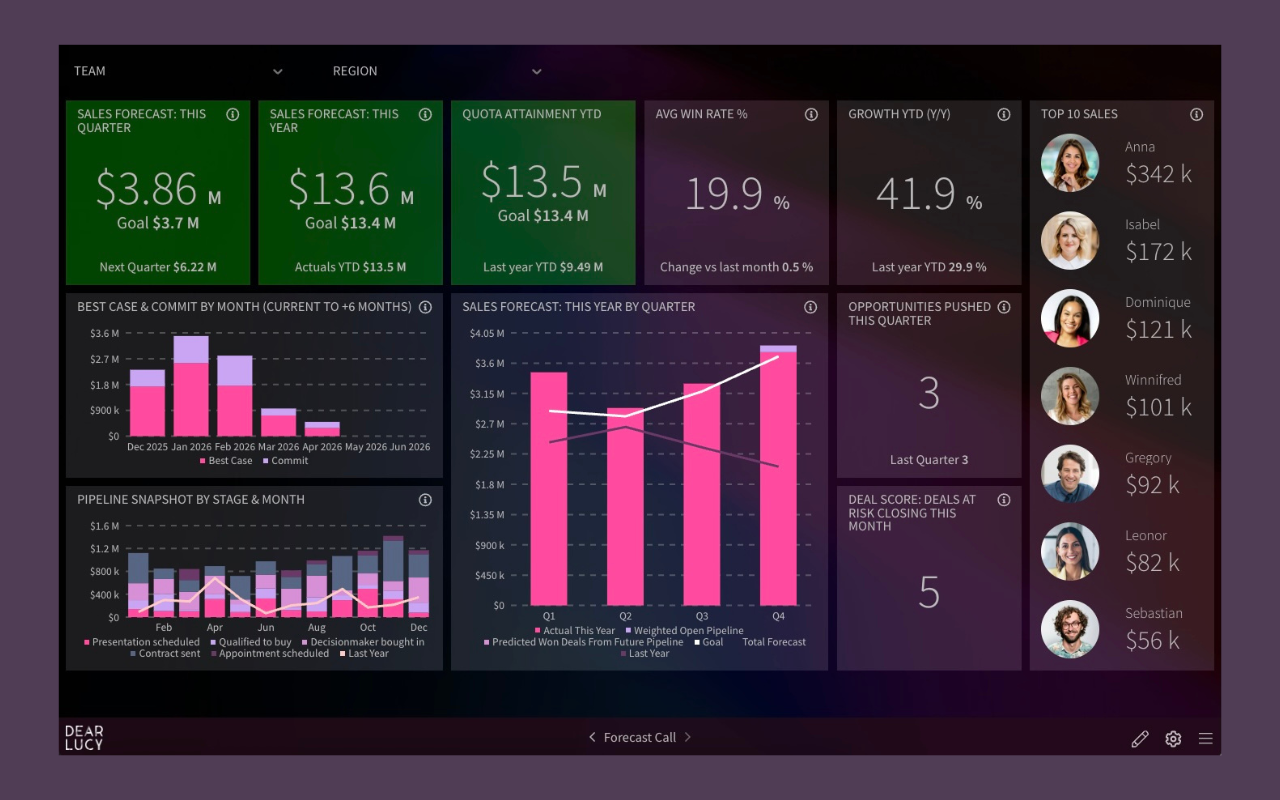
Pipeline & Forecast dashboard used in weekly forecast calls and board updates.
For leadership teams, pipeline dashboards are only useful when paired with visibility into Salesforce forecast accuracy — otherwise every number looks equally trustworthy.
Goal pacing: seeing problems early
Most teams can see quota. Far fewer can see pacing clearly.
A useful pacing view shows whether teams and reps are ahead or behind target, how pipeline supports the remaining gap, and whether momentum is improving or slipping week over week.
This is what allows CROs to stay proactive. Without pacing, issues surface late — often when the only remaining lever is pressure. With pacing, leaders can intervene early, adjust focus, and reallocate effort while there’s still time.
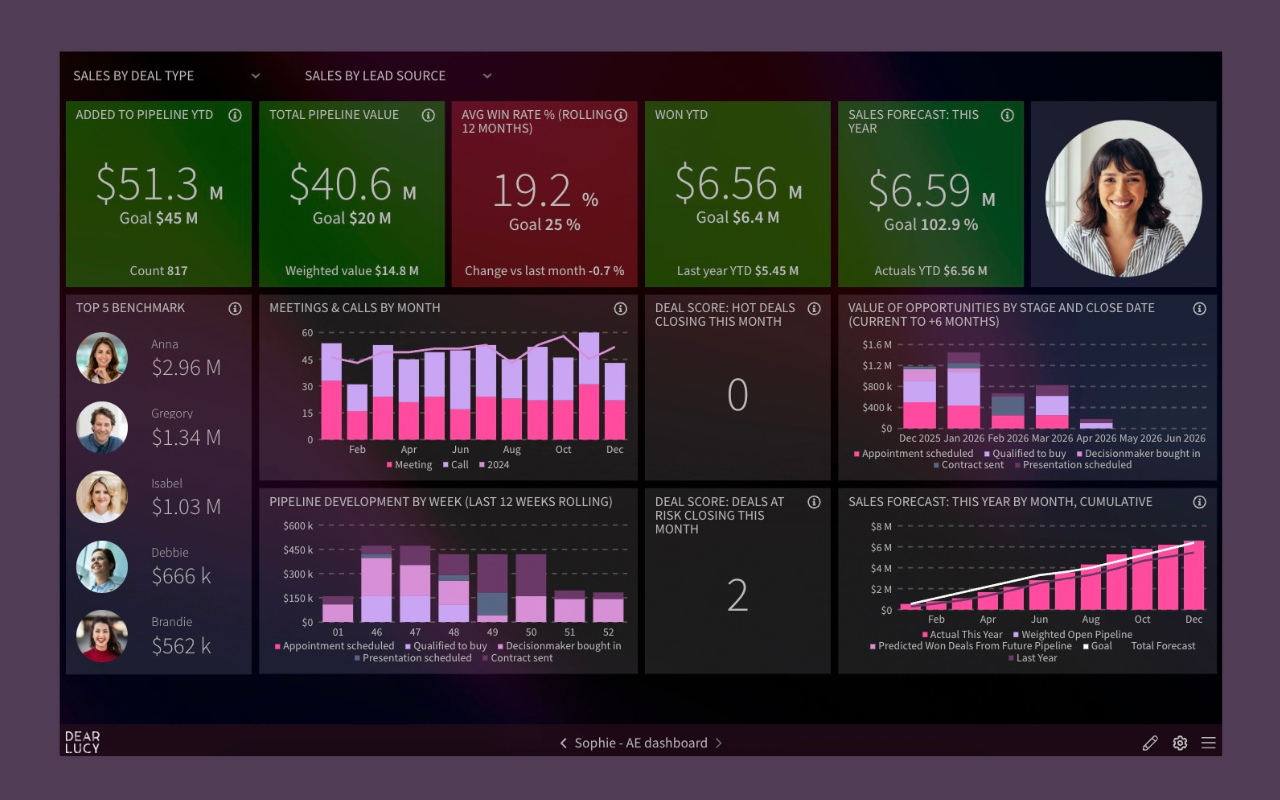
Goal pacing view showing whether reps and teams are ahead, on track, or at risk.
Pipeline analytics: where momentum builds or stalls
This is the view CROs use to understand how the system is behaving — not just what the outcome was.
Instead of asking “Why did we miss?” after the fact, pipeline analytics surfaces where momentum is changing: stage bottlenecks, conversion shifts, and velocity trends by team, region, or segment.
This dashboard is less about reporting outcomes and more about guiding coaching, prioritization, and process improvements.
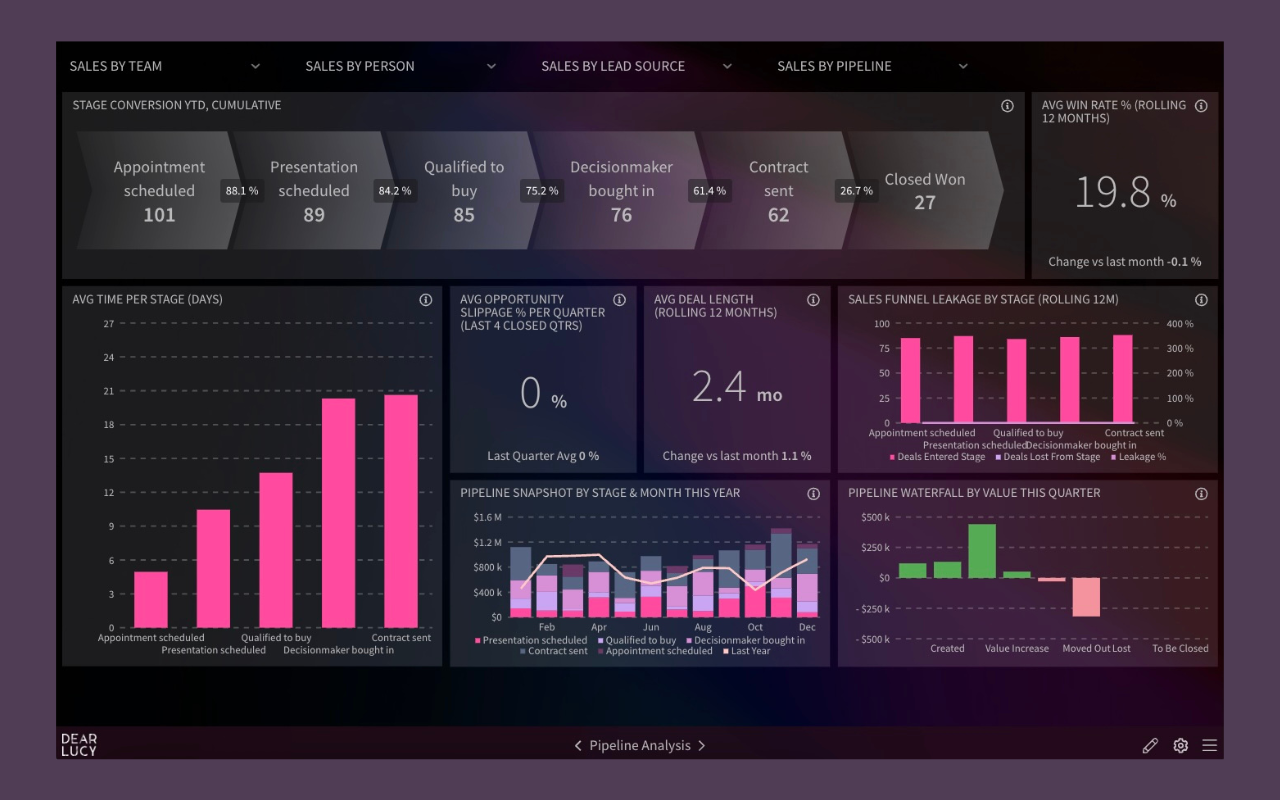
Pipeline analytics used to spot bottlenecks, conversion drops, and momentum shifts early.
CRM hygiene: protecting forecast credibility
Every CRO knows this one is uncomfortable — and necessary.
If deals sit unchanged, key fields are missing, or activity isn’t logged, forecasting becomes guesswork. Strong teams don’t treat CRM hygiene as a RevOps cleanup task. They make it visible and shared.
When hygiene issues are surfaced early, trust in the forecast improves. When they’re ignored, even good numbers become suspect.
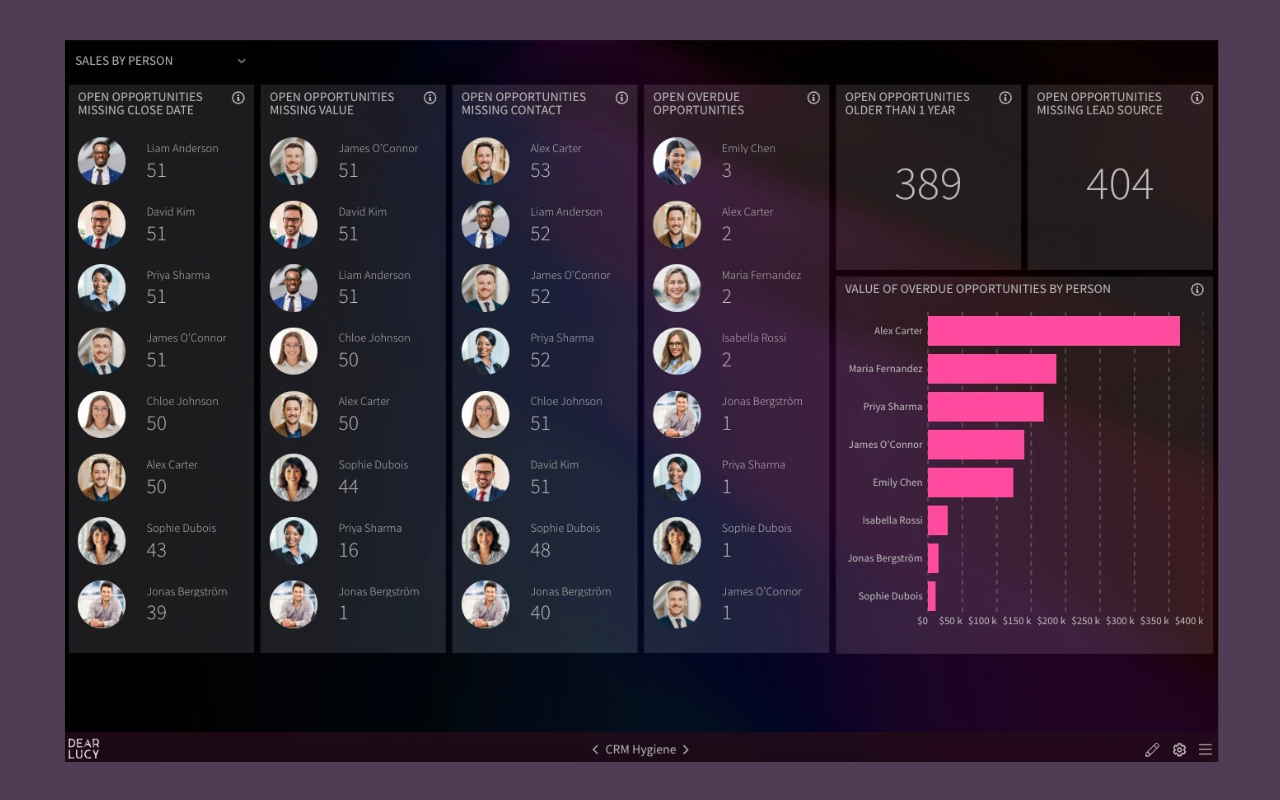
CRM hygiene view that protects forecast credibility by making data quality visible.
One revenue view, tailored for each role
The best Salesforce setups don’t give everyone the same dashboard — but they do give everyone the same truth.
Board members, CROs, managers, and reps will always look at revenue through different lenses. What can’t differ is the underlying data and logic.
When leadership reviews, forecast calls, and rep dashboards all roll up from the same revenue view, something important happens: meetings shift from explanation to decision. Time spent reconciling numbers drops, and alignment becomes the default — not a quarterly clean-up project.
This is less about dashboards and more about how the business runs week to week.
Why Salesforce-native dashboards often fall short for sales leadership
Salesforce dashboards are excellent at showing data. Where many CROs struggle is that they aren’t designed around leadership rhythms — forecast calls, leadership reviews, and board updates.
As the business evolves, reporting often turns into maintenance: dashboards need constant tweaks, forecasting and pacing logic lives elsewhere, and leaders end up with one view while reps use another. The outcome is predictable: teams export data before forecast calls, or rebuild board views manually, just to get to a version everyone trusts.
Not because Salesforce is broken — but because revenue leadership needs context, momentum, and trust, not just totals.
What “good” actually looks like
When Salesforce reporting works for sales leaders, it changes the cadence of the business:
Forecast calls are calmer and more focused
Managers coach with data instead of chasing updates
Reps know what matters this week
Board updates come straight from the same revenue view
That’s the bar. Not more reports. Not more customization. Just a clearer, shared understanding of where revenue stands — and what needs attention next.
Want to see how this works in practice?
Explore how sales teams turn Salesforce data into a shared, leadership-ready revenue view — used in forecast calls, team reviews, and board meetings.
Explore Salesforce reporting with Dear Lucy
FAQ: Salesforce Dashboards for Sales Leaders
Is Dear Lucy a Salesforce reporting tool?
Yes. Dear Lucy is a Salesforce reporting and revenue analytics tool designed for sales leaders. It turns Salesforce CRM data into ready-made dashboards for forecasting, goal pacing, pipeline analysis, and board reporting — without building complex Salesforce reports.
How is Dear Lucy different from native Salesforce dashboards?
Salesforce dashboards show raw data. Dear Lucy adds ready-made revenue metrics, forecasting logic, goal pacing, and role-based views so sales teams can act on the data — not just analyze it.
Does Dear Lucy replace Salesforce?
No. Dear Lucy does not replace Salesforce. It works on top of Salesforce, using your existing CRM data to provide clearer dashboards, forecasts, and leadership views.
Can sales reps, managers, and executives use the same dashboards?
Yes. Dear Lucy provides one shared revenue view built on the same Salesforce data, with dashboards tailored for reps, managers, CROs, and executives — ensuring everyone works from the same numbers.
How long does it take to set up Dear Lucy with Salesforce?
Most teams connect Salesforce and start using dashboards the same day. There is no custom report building and no manual data updates required.
Is Dear Lucy built for CROs and sales leadership?
Yes. Dear Lucy is designed specifically for CROs, sales leaders, and RevOps teams to support forecast calls, goal pacing, revenue reviews, and board reporting — not just operational reporting.
What types of Salesforce dashboards does Dear Lucy provide?
Dear Lucy provides ready-made Salesforce dashboards for pipeline and forecasting, goal pacing, sales performance, CRM hygiene, and leadership visibility — all updated automatically from Salesforce data.